Planning orgs and spaces in Cloud Foundry
This topic tells you about the considerations for effectively planning foundations, orgs, and spaces. You can plan your orgs and spaces to make the best use of the authorization features in Cloud Foundry.
An installation of Cloud Foundry is referred to as a foundation. Each foundation has orgs and spaces. For more information, see Orgs, Spaces, Roles, and Permissions.
The Cloud Foundry roles described in Orgs, Spaces, Roles, and Permissions use the principle of least privilege. Each role exists for a purpose and features in Cloud Foundry enable these purposes.
Consider these roles when planning your foundations, orgs, and spaces. This allows for full use of the features and assumptions of Cloud Foundry.
How Cloud Foundry layers relate to your company
The following sections describe what Cloud Foundry layers are and how they relate to your company structure.
Overview of Cloud Foundry layers
For an overview of each of the structural Cloud Foundry layers, see the following table:
| Cloud Foundry Layer | Challenge to Maintain | Contains | Description | Roles |
|---|---|---|---|---|
| Foundations | Hardest | Orgs | For shared components: domains, service brokers, and the physical infrastructure | Admin, Admin Read-Only, Global Auditor |
| Orgs | Average | Spaces | A group of users who share a resource quota plan, apps, services availability, and custom domains | Org Manager, Org Auditor, Org Billing Manager |
| Spaces | Easiest | Apps | A shared location for app development, deployment, and maintenance | Space Manager, Space Developer, Space Auditor |
Foundations
Foundations roughly map to a company and environments. For an illustration, see the following diagram:

Orgs
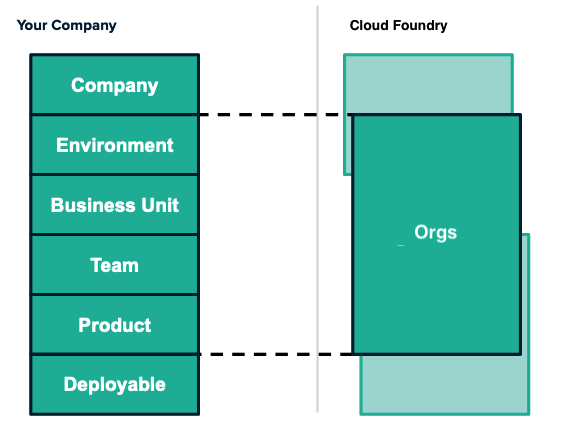
Orgs often map to a business unit in a particular foundation. To understand how you can map your company structure to a Cloud Foundry org, see the following diagram:
Spaces
Spaces can encompass teams, products, and specific deployables. To understand how you can map your company structure to a Cloud Foundry space, see the following diagram:

Mapping considerations
The following sections describe considerations you can make when mapping foundations, orgs, and spaces.
Planning for your environment
To effectively plan your environments, you must decide at what Cloud Foundry layer they belong.
Broad environments, such as production environments, are commonly mapped to a foundation. More specific environments are mapped to an org or space.
Because of the large human cost to maintaining a foundation, you might see foundations mapped to production and staging environments separately.
For examples of environments and how they map to Cloud Foundry layers, see the following table:
| Cloud Foundry Layer | Examples of Environments |
|---|---|
| Foundations | Production, Non-production, Sandbox |
| Orgs and Spaces | Development, UAT, QA |
Questions to consider about each Cloud Foundry layer
For guiding questions to help you make decisions about planning your Cloud Foundry structure, see the following table:
| Cloud Foundry Layer | Questions to Consider |
|---|---|
| Foundation |
|
| Org |
|
| Space |
|
Mapping larger and smaller subsets
Subsets are the company divisions you decide to map to Cloud Foundry. When creating your subsets, consider that the lower the Cloud Foundry layer, the more specific you want to map your subsets. Conversely, the higher the Cloud Foundry layer, the broader you want to make your subsets.
For more information about mapping larger subsets for each Cloud Foundry layer, see the following table:
| Cloud Foundry Layer | The impact of mapping larger subsets of your company |
|---|---|
| Foundations |
|
| Orgs |
|
| Spaces |
|
For more information about mapping smaller subsets for each Cloud Foundry layer, see the following table:
| Cloud Foundry Layer | The impact of mapping smaller subsets of your company |
|---|---|
| Foundations |
|
| Orgs |
|
| Spaces |
|